At Ardent Sport my job was the backend: rework the code so the APIs responded faster, build new endpoints, and track down the server errors that were showing up as 502 Bad Gateway. The specifics of that codebase stay with the company, but the process carries over to almost any Express API. This is the checklist I work through, in order.
The examples use Express with MongoDB through Mongoose. The ideas apply just as well to SQL.
1. Measure before you change anything
Guessing which endpoint is slow wastes days. Start by timing every request — and send the number back to the browser with the Server-Timing header, so it shows up in the DevTools Network panel without any extra tooling:
import type { RequestHandler } from "express";

export const timing: RequestHandler = (req, res, next) => {
  const start = process.hrtime.bigint();
  const writeHead = res.writeHead;

  res.writeHead = function (...args: Parameters<typeof writeHead>) {
    const ms = Number(process.hrtime.bigint() - start) / 1e6;
    res.setHeader("Server-Timing", `app;dur=${ms.toFixed(1)}`);
    return writeHead.apply(this, args);
  } as typeof writeHead;

  res.on("finish", () => {
    const ms = Number(process.hrtime.bigint() - start) / 1e6;
    if (ms > 300) console.warn(`[slow] ${req.method} ${req.originalUrl} ${ms.toFixed(0)}ms`);
  });
  next();
};
process.hrtime.bigint() is monotonic and nanosecond-precise, unlike Date.now(). Patching writeHead lets the header be set at the last moment, right before the response goes out. Once you can see which routes are slow, profile the slowest one first.
2. Kill the N + 1 queries
The most common reason a list endpoint is slow: one query for the list, then one more query per row to fetch something related.
const matches = await Match.find({ season }).lean();

for (const match of matches) {
  match.venue = await Venue.findById(match.venueId).lean();
}
Twenty matches means twenty-one round trips to the database, each waiting for the one before it. Fetch the related rows in one query instead, and join them in memory:
const matches = await Match.find({ season }).lean();

const venueIds = [...new Set(matches.map((m) => String(m.venueId)))];
const venues = await Venue.find({ _id: { $in: venueIds } }).lean();
const byId = new Map(venues.map((v) => [String(v._id), v]));

for (const match of matches) {
  match.venue = byId.get(String(match.venueId));
}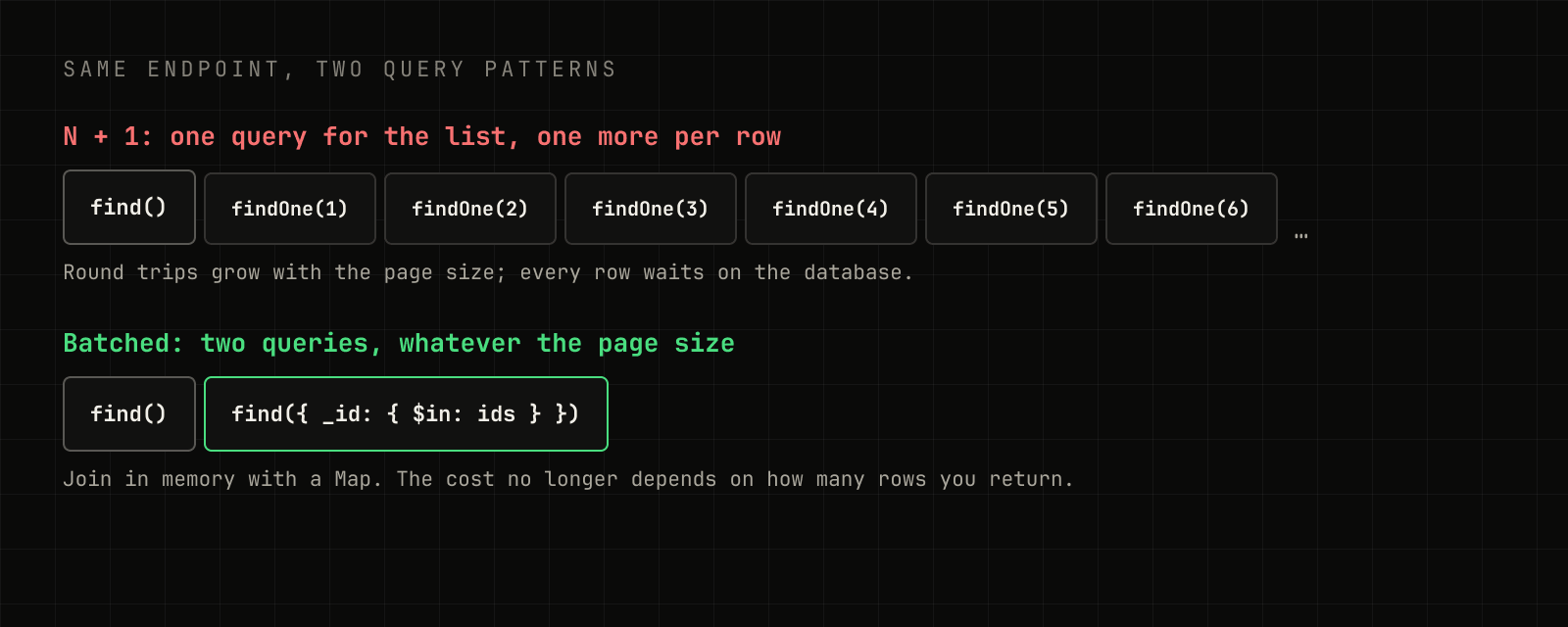
Mongoose's populate() does the same batching for you when the relationship is modelled as a ref. Either way, the cost stops growing with the size of the page.
3. Let the database do less work
Once the number of queries is right, make each one cheaper.
Index what you filter and sort on. Ask MongoDB how it ran the query:
const plan = await Match.find({ season, status: "live" }).sort({ startsAt: -1 }).explain("executionStats");If the winning plan is a COLLSCAN, every document is being read. A compound index that matches the filter and sort fixes it:
matchSchema.index({ season: 1, status: 1, startsAt: -1 });Return only what the client uses. .select() the fields you need and use .lean() so Mongoose returns plain objects instead of full documents:
const rows = await Match.find({ season }).select("homeTeam awayTeam startsAt score").lean();Paginate everything that can grow. An endpoint that returns "all matches" is fast in development and slow in production. A cursor on an indexed field stays fast at any depth, unlike skip():
const page = await Match.find(cursor ? { startsAt: { $lt: cursor } } : {})
  .sort({ startsAt: -1 })
  .limit(20)
  .lean();
4. Stop waiting in line
Independent work shouldn't run one after another:
const [match, standings, news] = await Promise.all([
  Match.findById(id).lean(),
  Standing.find({ season }).lean(),
  News.find({ matchId: id }).limit(5).lean(),
]);
And don't block the event loop. A synchronous crypto.pbkdf2Sync, a huge JSON.parse, or a tight loop over thousands of items stalls every request on that process, not just the current one. Node can tell you when it happens:
import { monitorEventLoopDelay } from "node:perf_hooks";

const delay = monitorEventLoopDelay({ resolution: 20 });
delay.enable();

setInterval(() => {
  const p99 = delay.percentile(99) / 1e6;
  if (p99 > 100) console.warn(`[event-loop] p99 delay ${p99.toFixed(0)}ms`);
  delay.reset();
}, 10_000);
5. Fix the 502s
A 502 Bad Gateway means the proxy in front of Node — a load balancer or nginx — couldn't get a valid response. The usual causes:
- The process crashed. An unhandled promise rejection or a thrown error outside Express's error handling takes the process down, and every in-flight request becomes a 502 until it restarts. Every async route needs its errors to reach an error middleware.
- An upstream call hung. A call to another service without a timeout holds the request open until the proxy gives up. Give outbound calls a deadline with
AbortSignal.timeout(ms). - A keep-alive timeout mismatch. This one is subtle, intermittent, and very common.
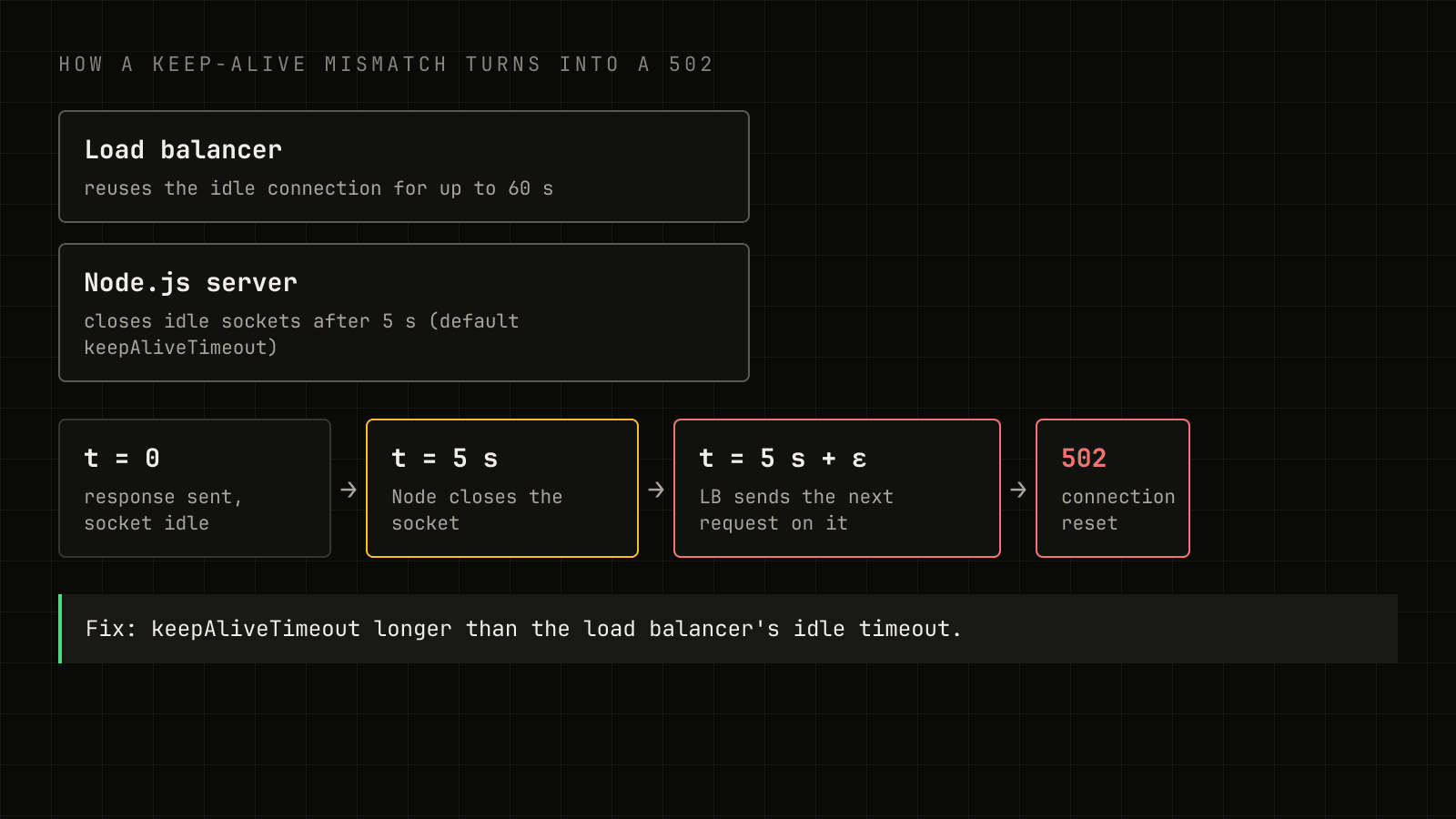
Load balancers keep idle connections to your server open and reuse them — AWS's Application Load Balancer, for example, defaults to a 60-second idle timeout. Node's HTTP server closes idle keep-alive sockets after 5 seconds by default. Between second 5 and second 60, the load balancer can send a request down a socket Node has just closed, and that request fails as a 502.
The fix is to make Node the side that waits longer:
const server = app.listen(port);

server.keepAliveTimeout = 65_000;
server.headersTimeout = 66_000;
headersTimeout must be larger than keepAliveTimeout, or Node can cut off a request that arrives on a kept-alive socket while it's still reading the headers.
The order matters
Measure, then fix the query count, then make each query cheaper, then parallelise, then harden. Each step makes the next one easier to see, and the timing middleware from step 1 tells you when you're done.