After shipping a gallery page on this site, two bug reports came in on the same day: clicking the logo dropped people into the middle of the Experience section, and opening the gallery landed them halfway down the photos instead of at the top. On a phone it was worse — almost every page change landed mid-page.
None of it reproduced on a fresh load. It only happened on client-side navigations, which pointed straight at how the Next.js App Router decides where to scroll.
What the App Router does after a navigation
When a route changes, the App Router renders the new segment and then runs a small scroll handler. Reading it in next/dist/client/components/layout-router.js, the logic is roughly:
- Find the top edge of the new page's content.
- If that edge is already inside the viewport, do nothing.
- Otherwise set
scrollTop = 0, and if the content is still not visible, callscrollIntoView()on it.
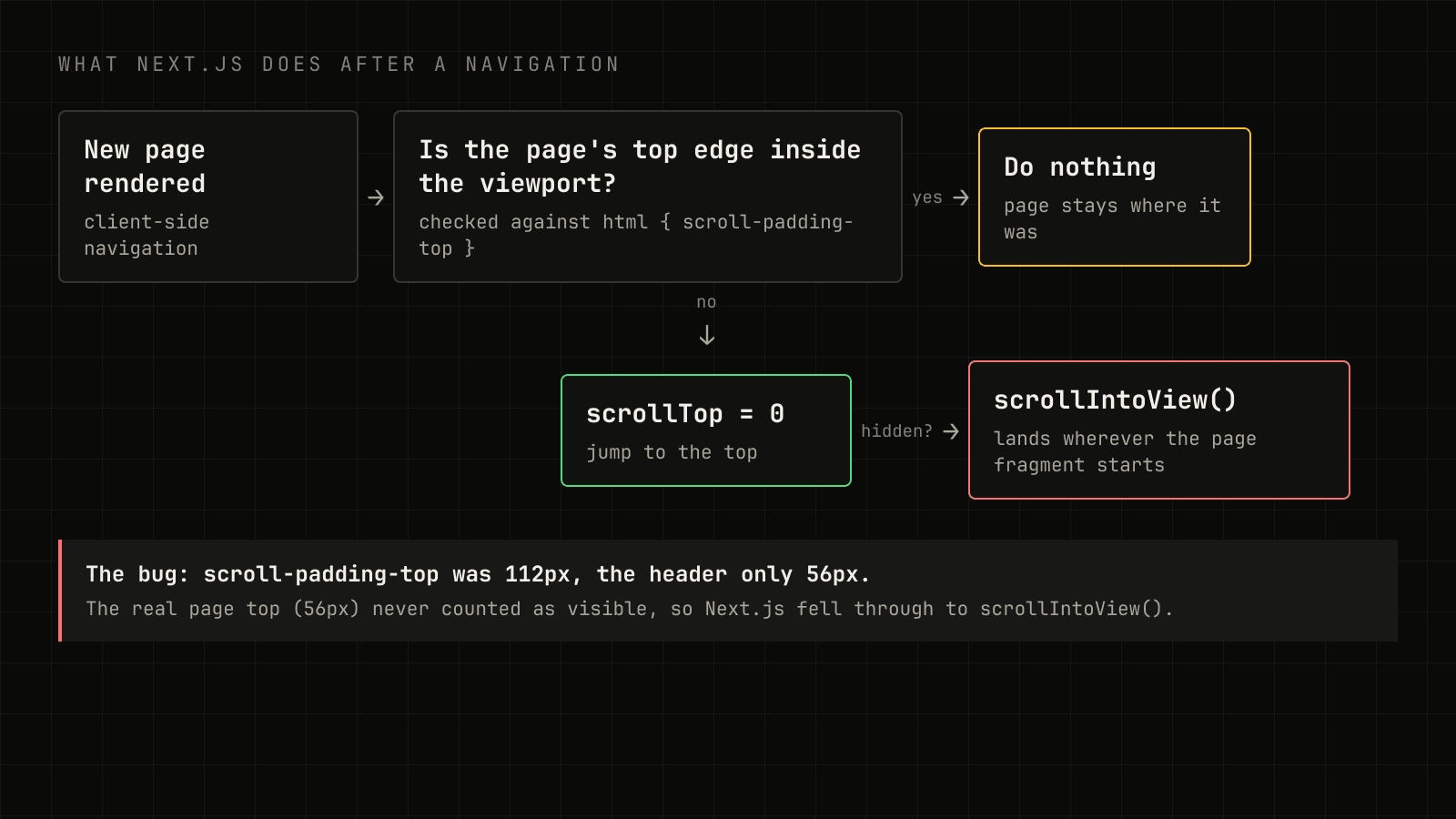
The important detail is how "inside the viewport" is measured. The check doesn't start at 0 — it starts at the root element's scroll-padding-top:
const scrollPaddingTop = parseFloat(getComputedStyle(html).scrollPaddingTop);
const visible = elementTop >= scrollPaddingTop && elementTop <= viewportHeight;
The two settings that caused it
scroll-padding-top on html
The site has a sticky header (56px, plus a 40px section bar on phones). To stop anchor links like /#experience from hiding headings under it, the global CSS had:
html {
  scroll-padding-top: calc(var(--header-height) + var(--subnav-height) + 1rem);
}
That's 72px on desktop and 112px on phones. But every page's content starts directly under the 56px header — so its top edge (56px) was always less than the scroll padding. Next.js concluded the top wasn't visible, skipped the "do nothing" branch, and fell through to scrollIntoView() on the page fragment, which landed wherever that fragment's first box happened to be.
Smooth scrolling during route changes
The site also sets scroll-behavior: smooth on html. Next.js 16 changed how it treats that: it no longer turns smooth scrolling off while it scrolls a new route into place, unless you opt in. Without the opt-in, its jump to the top animates — and the follow-up measurement reads the page halfway through the animation.
The fix, part one: two lines of configuration
Move the header offset off the root element and onto the elements that anchors actually target:
[id] {
  scroll-margin-top: calc(var(--header-height) + var(--subnav-height) + 1rem);
}
Anchor links still stop below the header (scroll-margin-top is honoured by scrollIntoView and by fragment navigation), but the root's scroll padding is back to 0, so the App Router sees the real page top.
Then opt back into Next.js handling smooth scrolling, as the Next.js 16 upgrade guide describes:
return (
  <html lang="en" data-scroll-behavior="smooth">
    <body>{children}</body>
  </html>
);
With just these two changes, every navigation to a different page started at the top.
The fix, part two: Back and Forward
Testing harder turned up two more cases:
- Clicking a link to the page you're already on (the logo on the home page) did nothing, because there's no new segment to render, so the scroll handler never runs.
- Back and Forward restored the wrong position. The App Router leaves history traversal to the browser, and the browser restores the old scroll offset immediately — before React has rendered the previous page. The offset gets applied to the wrong document and clamped.
Both are handled by one small client component in the root layout. It takes over scroll restoration, remembers the offset for each history entry, and only restores it once the right page is actually on screen:
"use client";

import { usePathname } from "next/navigation";
import { useEffect, useLayoutEffect, useRef } from "react";

const currentKey = () => window.navigation?.currentEntry?.key ?? location.pathname + location.search + location.hash;

export function ScrollManager() {
  const pathname = usePathname();
  const renderedPath = useRef(pathname);
  const restoring = useRef(false);

  useLayoutEffect(() => {
    renderedPath.current = pathname;
  }, [pathname]);

  useEffect(() => {
    history.scrollRestoration = "manual";
    const positions: Record<string, number> = {};

    const save = () => {
      if (!restoring.current) positions[currentKey()] = scrollY;
    };

    const restore = () => {
      const target = positions[currentKey()] ?? 0;
      const deadline = performance.now() + 2500;
      restoring.current = true;
      const step = () => {
        const rendered = renderedPath.current === location.pathname;
        const room = document.documentElement.scrollHeight - innerHeight;
        if ((rendered && room >= target) || performance.now() > deadline) {
          scrollTo({ top: target, behavior: "instant" });
          restoring.current = false;
          return;
        }
        requestAnimationFrame(step);
      };
      requestAnimationFrame(step);
    };

    addEventListener("scroll", save, { passive: true });
    addEventListener("popstate", restore);
    return () => {
      removeEventListener("scroll", save);
      removeEventListener("popstate", restore);
    };
  }, []);

  return null;
}
The version running on this site adds three things on top: positions are kept in sessionStorage so a refresh keeps your place, same-page links (and "Back to top") smooth-scroll to the top without adding a history entry, and any forward navigation to a new page without a #hash is pinned to exactly y = 0.
Why the key matters
The first version keyed positions by URL. A test immediately broke it: visit /, open a project, click the logo back to /, then press Back twice. Both visits to / share a URL, so the second (at the top) overwrote the first.
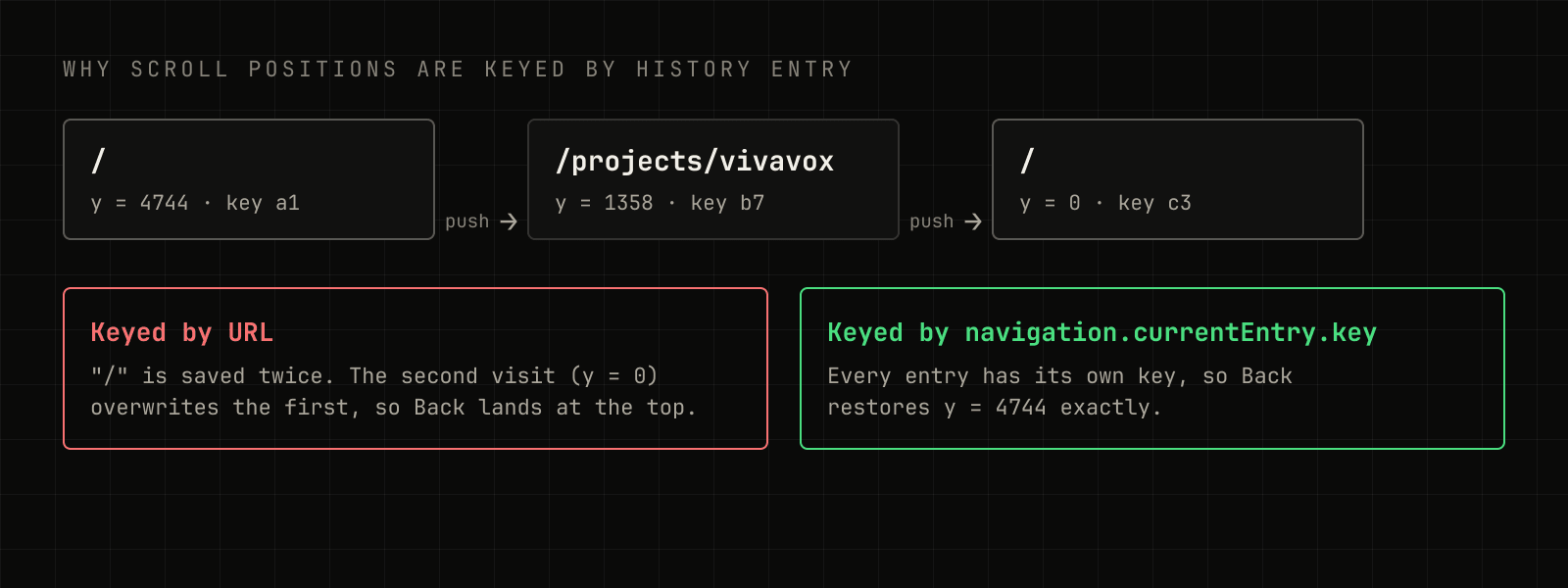
The Navigation API (opens in a new tab) gives every history entry a unique navigation.currentEntry.key, which is exactly the identity a scroll position belongs to. Browsers without it fall back to the URL.
How it was tested
Bugs like this hide in sequences, not single clicks, so the check was a scripted run in a real browser: home ↔ gallery ↔ project pages, the logo, every nav and section link, "Back to top", and Back/Forward — with a random scroll before every step — at 1440, 1024, 768, 390 and 320 pixels wide. Each step asserts one rule:
| Action | Expected |
|---|---|
| Link to a different page | lands at y = 0 |
| Link to the current page | smooth-scrolls to the top |
Section link (/#work) | heading sits just below the header |
| Back / Forward | exact previous position |
| Refresh | keeps the position |
All 159 steps pass. The takeaway: scroll-padding-top on the root element isn't just an anchor-link nicety — in the App Router it also decides whether your page counts as "already visible".