At CodeFobe I took a React Native app and turned it into a web version — from the same codebase, using Webpack and React Native Web (opens in a new tab). No rewrite, no second app to keep in sync. This post walks through how that setup works and the problems you hit along the way.
How React Native Web works
React Native Web is an implementation of the React Native component and API surface on top of React DOM. <View> renders a <div>, <Text> renders a <span>, StyleSheet.create produces atomic CSS classes, and APIs like Platform, Dimensions and Linking have browser versions.
Your app code keeps importing from react-native. The trick is entirely in the bundler: on the web, every import of react-native is redirected to react-native-web.
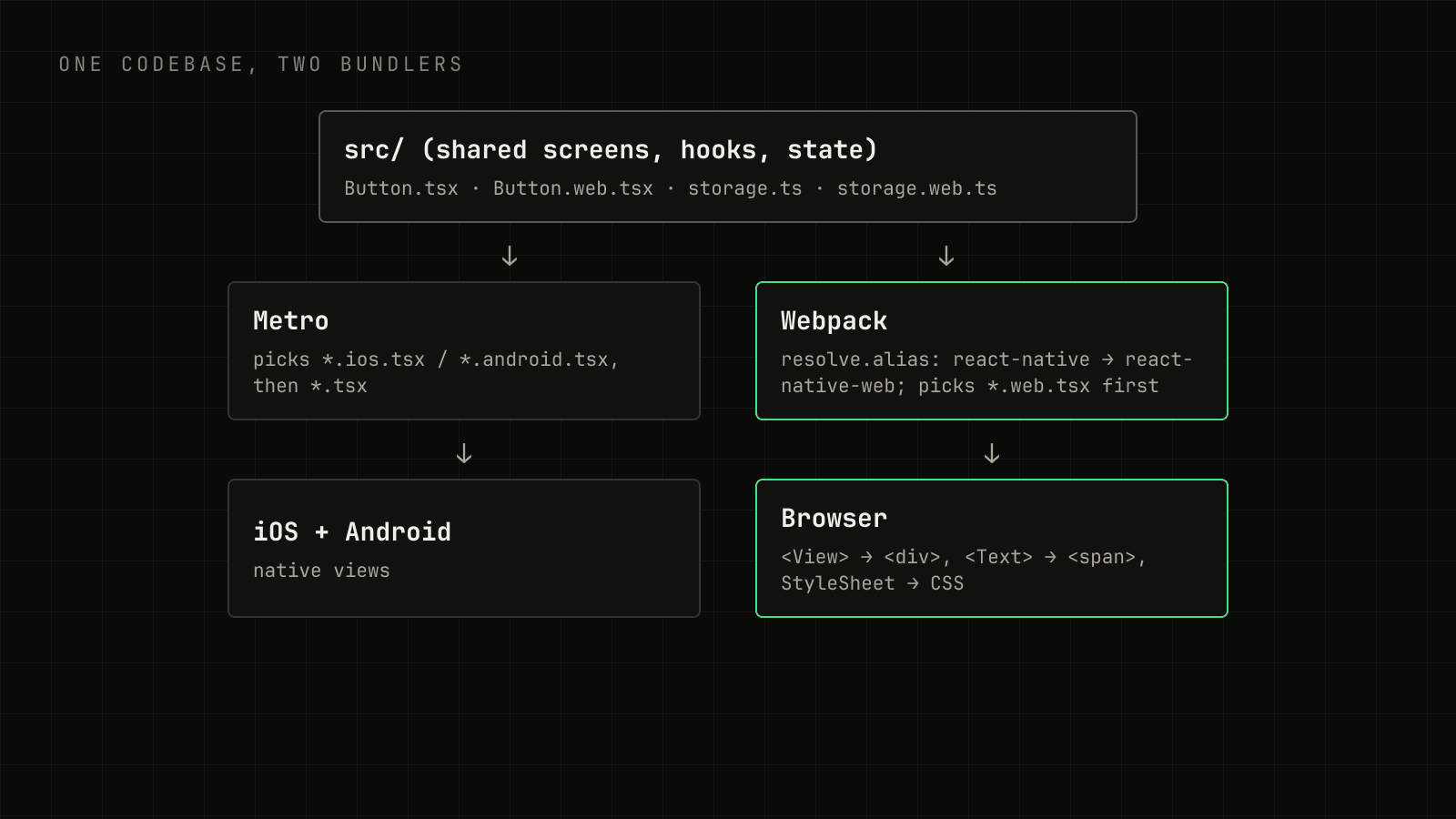
The Webpack setup
The core of the configuration is an alias and an extension order:
const path = require("path");
const HtmlWebpackPlugin = require("html-webpack-plugin");

const appDirectory = __dirname;

module.exports = {
  entry: path.resolve(appDirectory, "index.web.js"),
  output: {
    path: path.resolve(appDirectory, "dist"),
    filename: "[name].[contenthash].js",
    publicPath: "/",
  },
  resolve: {
    alias: { "react-native$": "react-native-web" },
    extensions: [".web.tsx", ".web.ts", ".web.js", ".tsx", ".ts", ".js"],
  },
  module: {
    rules: [
      {
        test: /\.[jt]sx?$/,
        include: [
          path.resolve(appDirectory, "index.web.js"),
          path.resolve(appDirectory, "src"),
          path.resolve(appDirectory, "node_modules/react-native-vector-icons"),
        ],
        use: {
          loader: "babel-loader",
          options: {
            cacheDirectory: true,
            presets: ["module:@react-native/babel-preset"],
            plugins: ["react-native-web"],
          },
        },
      },
      { test: /\.(png|jpe?g|gif|svg)$/, type: "asset/resource" },
      { test: /\.ttf$/, type: "asset/resource" },
    ],
  },
  plugins: [new HtmlWebpackPlugin({ template: "./public/index.html" })],
  devServer: { historyApiFallback: true },
};
A few lines here do most of the work:
"react-native$": "react-native-web"— the$makes it an exact match, so onlyimport … from "react-native"is redirected, not deep paths..web.tsxfirst inextensions— when bothButton.tsxandButton.web.tsxexist, the web build picks the web file automatically, the same way Metro picks.ios.tsxor.android.tsx.includelists third-party packages that ship untranspiled JSX or Flow, which many React Native libraries do. If a library breaks the web build with a syntax error, it usually needs adding here.babel-plugin-react-native-webrewrites imports so only the components you use end up in the bundle.
The web entry point registers the same root component the native apps use:
import { AppRegistry } from "react-native";
import App from "./src/App";

AppRegistry.registerComponent("App", () => App);
AppRegistry.runApplication("App", {
  rootTag: document.getElementById("root"),
});
Platform files for the parts that differ
Most screens work unchanged. The parts that don't are usually native-only modules — device sensors, native pickers, or anything that calls into Java or Swift. Rather than scattering Platform.OS === "web" checks through components, put the difference behind a file pair with the same exports:
import AsyncStorage from "@react-native-async-storage/async-storage";

export const storage = {
  get: (key: string) => AsyncStorage.getItem(key),
  set: (key: string, value: string) => AsyncStorage.setItem(key, value),
};export const storage = {
get: async (key: string) => window.localStorage.getItem(key),
set: async (key: string, value: string) => window.localStorage.setItem(key, value),
};Every screen imports storage from src/lib/storage and gets the right one on each platform. Keep the two files' signatures identical — TypeScript only checks the one it resolves, so a mismatch slips through on the other platform.
For a module with no web equivalent, the .web file can export a no-op or a fallback UI, so the feature degrades instead of crashing the bundle.
What the web needs that phones don't
Getting the app to run in a browser is the first half. Making it feel right there is the second.
Layout that responds to width. Phones are narrow and fixed; browser windows resize. Dimensions.get("window") is read once, so prefer the useWindowDimensions() hook, which re-renders on resize, and cap content width on large screens:
const { width } = useWindowDimensions();
const wide = width >= 768;

return (
  <View style={[styles.page, wide && { maxWidth: 960, alignSelf: "center" }]}>
    {wide ? <SideNav /> : <TabBar />}
    <Content />
  </View>
);
Scrolling. A ScrollView with flex: 1 inside a parent without a height collapses on the web. Make sure the chain from the root down to the scroll container has real heights — usually by giving html, body and #root a full height in the HTML template.
Pointer interactions. The web has hover and a mouse cursor. Pressable supports both through its hovered state, and it's worth adding hover styles to anything clickable so the app doesn't feel like a phone screen in a window.
Fonts and icons. Native apps bundle .ttf files; on the web they have to be loaded with @font-face. Icon libraries like react-native-vector-icons need their font files imported once at the web entry so the glyphs render.
Navigation and URLs. On the web people expect the address bar, Back button and shareable links to work. If you use React Navigation, enable its linking configuration so screens map to real URLs.
Was it worth it?
For a product team, one codebase that ships to iOS, Android and the web means a fix lands everywhere at once, and the web version is a link you can send — no app store, no install. The cost is a handful of .web files and some care around layout. For most screens, the honest answer is: they just worked.